

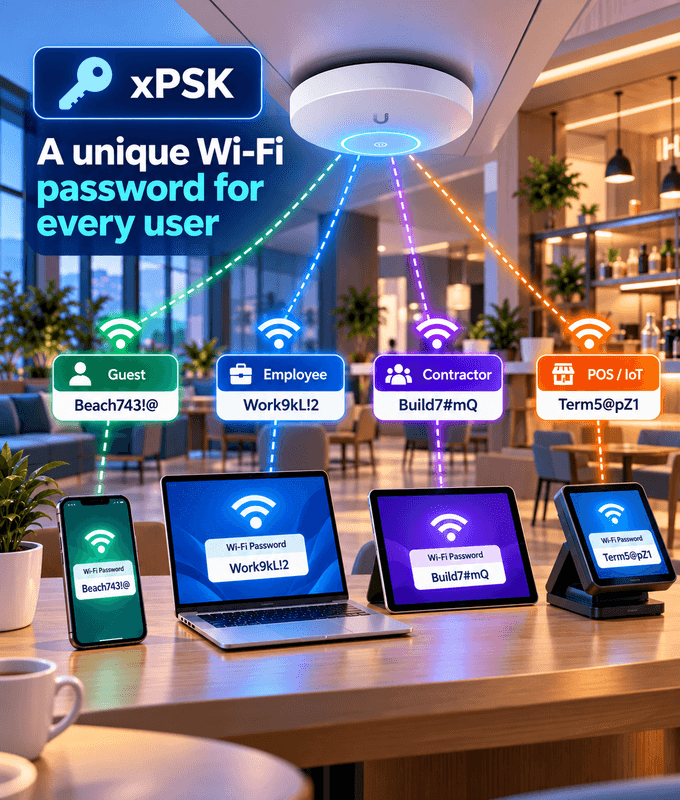
A unique Wi-Fi password for every user
Give each user their own Wi-Fi password instead of one shared password for the whole venue.
Support for iPSK, MPSK, DPSK and PPSK, the names different vendors use for per-user passwords.
Decommission individual accounts and attach policies, such as rate limits based on service tiers.
One idea, many names
Vendors use different names for per-user pre-shared keys. We support each of them, so you can have unique passwords on the equipment you already have.
iPSK
Identity PSK
MPSK
Multiple PSK
DPSK
Dynamic PSK
PPSK
Private PSK
No more shared Wi-Fi passwords
A Password for Every User
Each user gets their own Wi-Fi password on the same network, instead of everyone sharing one.
Stronger Security
A leaked password only affects one account, not your whole venue.
No Venue-Wide Password Rotation
When a password is compromised, there's no need to change the venue's password and reconnect every device.
Decommission Any Account
Remove a user's access when they leave, without affecting anyone else on the network.
Policies per Account
Attach policies to each account, such as rate limits based on service tiers.
Works on Any Wi-Fi Device
Users connect with a normal Wi-Fi password, so it works on phones, laptops, smart TVs, printers and IoT devices alike.
Student Housing
Apartments/MDUs
Offices
Hotels
Made for places where many people share one network
Student Housing: Give every student their own Wi-Fi password, and decommission it when they move out.
Apartments/MDUs: Each resident gets their own password, with speeds based on the tier they're on.
Offices: Separate passwords for staff and for devices like printers and IoT, and remove access as soon as someone leaves.
Hotels: Give each guest their own password for their stay, and decommission it when they leave.
Companies all over the world are using our products and services


































Frequently Asked Questions
Common questions about xPSK and per-user Wi-Fi passwords.
What is xPSK?
xPSK is a common name for giving each user their own pre-shared key (Wi-Fi password) on the same network. Equipment vendors call it different things, such as iPSK, MPSK, DPSK and PPSK, and we support all of them.
How is it different from a normal Wi-Fi password?
With a normal network, everyone shares one password. With xPSK, every user has their own password for the same network, so each person's access can be managed separately.
Why is xPSK more secure than a shared password?
If a shared password leaks, anyone can join and the whole venue is exposed. With xPSK, a leaked password only affects one account, and you can disable just that account.
What happens when a password is compromised or someone leaves?
You decommission that user's account. Everyone else keeps connecting as normal, with no venue-wide password change and no reconnecting every device.
Can different users get different speeds?
Yes. You can attach policies to each account, such as rate limits based on service tiers.
Do users need an app or certificate?
No. Users connect with a normal Wi-Fi password, so xPSK works on phones, laptops, smart TVs, printers and IoT devices alike.
Will it work with my access points?
Most enterprise Wi-Fi vendors support a form of per-user PSK under their own name. Tell us what equipment you use and we'll confirm.
Should I use xPSK or 802.1X?
802.1X (WPA-Enterprise) gives the strongest security but needs devices that support it. xPSK is simpler for users and works on any Wi-Fi device. Many networks use both, and we'll help you choose.