

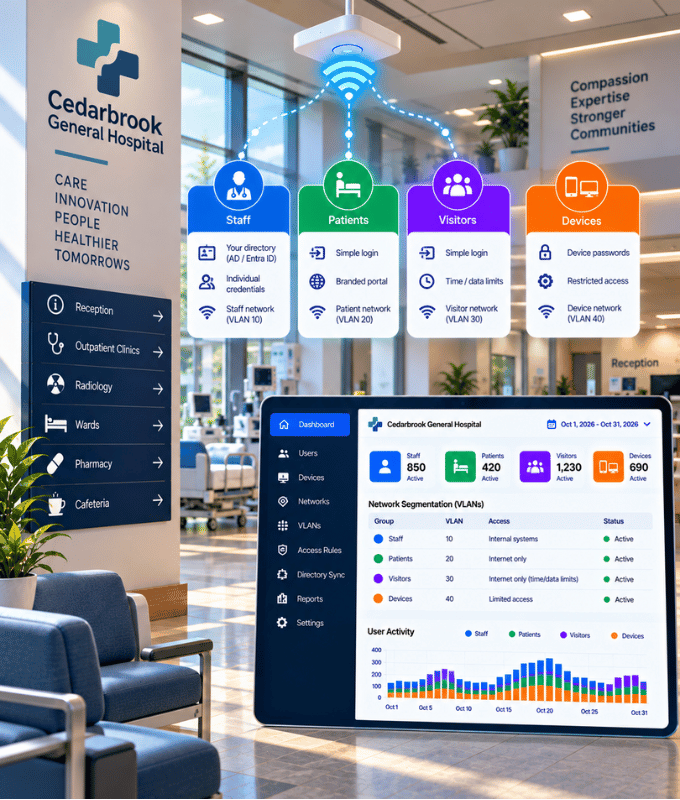
The right access for staff, patients and visitors, kept safely apart
Staff sign in with their own credentials, checked against the accounts you already have.
Patients and visitors get a simple branded login, and devices get their own passwords, each on a separate network.
How we help hospitals
Secure Wi-Fi for the people and devices inside your hospital, and a clear view of who is connected.
Staff Sign In With Their Own Credentials
With 802.1X, every staff member connects with their own credentials or certificate, instead of one shared password.
Different Access for Each Group
Place groups on different VLANs and give each its own policies, such as different speeds for staff and visitors.
Devices Kept Separate
Devices such as smart TVs, printers and IoT devices get their own unique Wi-Fi password with xPSK, separate from staff and visitors.
Patient and Visitor Wi-Fi
Welcome patients and visitors through a branded captive portal, separate from staff access.
Multi-Factor Authentication
Require a second verification factor on top of the password for stronger protection of network access.
Know Who Connected
Keep detailed authentication and session logs, so you always know who connected, when and from where.
Fair-Use Limits
Set rate limits and time and volume quotas per user or group, where your hardware supports it.
Professional Services
Our network experts can help with design, predictive surveys, installation, testing and more, for new sites or upgrades to your existing network.
Solutions for Hospitals
The Splash Networks solutions and services that fit your venue best.
Identity & Access Management
Network access driven by Active Directory, Entra ID or Google Workspace.
Captive Portal
Branded guest Wi-Fi login, from one-click access to email or SMS verification, vouchers and payment.
Frequently Asked Questions
How do staff connect to the Wi-Fi?
With 802.1X, each staff member signs in with their own credentials or certificate, checked against your user directory, instead of a shared password.
Can different groups get different access?
Yes. Users can be placed on different VLANs and given different policies, such as rate limits, based on their directory groups.
How do devices that can't use 802.1X connect?
Devices such as smart TVs, printers and IoT devices can use xPSK instead, with a unique password for each device. Many networks combine 802.1X for staff with xPSK for devices and a captive portal for guests.
How do patients and visitors connect?
Through your captive portal, with the sign-in you choose, such as one click or email or SMS verification, separate from staff access.
Can we see who connected and when?
Yes. Detailed authentication and session logs, with reporting on users, sessions and usage.
Will it work with our existing Wi-Fi equipment?
Splash Networks works with access points and routers from many vendors. See our Supported Hardware page, or ask us about your equipment.
Have more questions? Ask your question here
Companies all over the world are using our products and services