

Enterprise Wi-Fi security with individual credentials
Every user and device connects with their own credentials or certificate, instead of one shared password.
WPA2/WPA3-Enterprise encryption, with EAP-TLS, PEAP, EAP-TTLS and other EAP methods.
Backed by our cloud or on-premises RADIUS, connected to the user directories you already use.
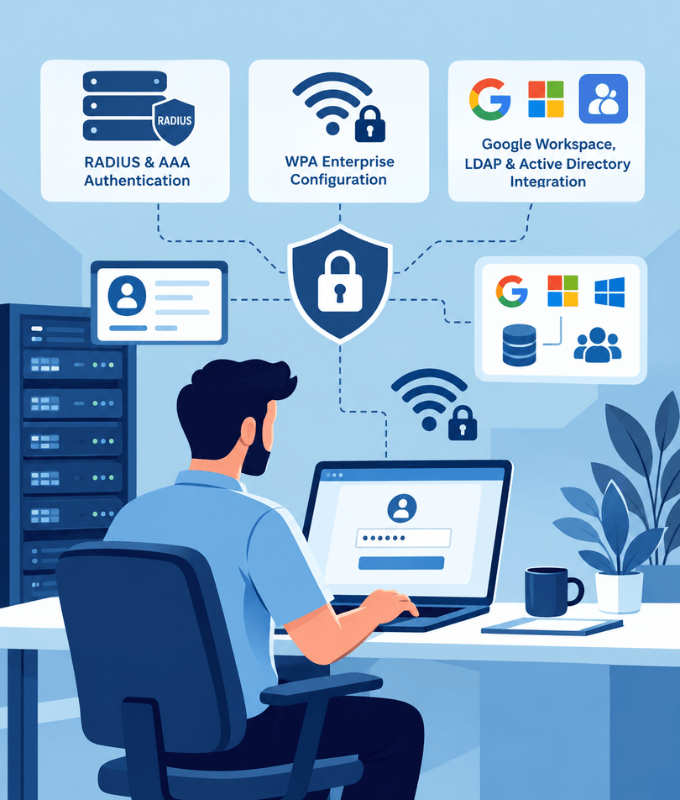
The most secure way to connect users and devices to your Wi-Fi
Individual Credentials
Every user connects with their own credentials instead of one shared password, so you always know who's on your network.
Certificate-Based Authentication
Authenticate devices with digital certificates instead of passwords, for stronger, phishing-resistant security.
WPA2/WPA3-Enterprise Encryption
Every connection is authenticated and encrypted with the latest enterprise Wi-Fi security standards.
Revoke Access per User
Disable one user's access when they leave, without changing a password for everyone else.
Directory Integration
Authenticate users against the directories you already use, so there's no separate user database to maintain.
Group-Based VLANs & Policies
Place users on different VLANs and apply different policies based on their directory groups.
Multi-Factor Authentication
Require a second verification factor on top of the password for stronger protection of network access.
Dynamic Policies with CoA
Change a live session's policy or disconnect a user instantly with Change of Authorization (CoA), with no reconnect needed.
Logging & Reporting
Keep detailed authentication and session logs, and report on users, sessions and usage.
Cloud or On-Premises RADIUS
Run RADIUS in the cloud for multi-site networks, or on your own servers to keep authentication inside your network.
Flexible EAP support
The most common 802.1X methods, and others when you need them. Choose what fits your users, devices and security requirements.
EAP-TLS
Certificate-based authentication on both the client and the server. The strongest option, with no passwords to steal.
PEAP
Username and password sent inside an encrypted TLS tunnel. Widely supported and easy to roll out.
EAP-TTLS
Username and password inside a TLS tunnel, with flexible inner authentication methods for different directories.
Other EAP Methods
Need something else? We can work with other EAP methods your devices or network require.
SQL Databases
Google Workspace
LDAP
Active Directory
Microsoft Entra ID
And More
Sign in with the accounts your users already have
Users connect with their existing directory credentials, so there's no separate Wi-Fi account to create or maintain.
Integrations with SQL databases, Google Workspace, LDAP, Active Directory, Microsoft Entra ID and other identity providers.
Let users sign in to WPA-Enterprise Wi-Fi with their Google Workspace accounts. See how with FreeRADIUS and Secure LDAP
Assign VLANs and policies based on directory groups. See how with Google Workspace Secure LDAP
Don't see your directory? We can integrate with other identity sources too. Talk to us
Works alongside your other sign-in methods
Use 802.1X for staff, and combine it with other methods for guests and devices.
Captive Portal for Guests
A branded sign-in page for visitors, with click-through, OTP, vouchers, payment and more.
xPSK for Other Devices
A unique Wi-Fi password for each user or device, including devices that don't support 802.1X.
Passpoint with MDM
Push Passpoint profiles to company devices through your MDM, so staff connect automatically and securely.
Companies all over the world are using our products and services























Frequently Asked Questions
Common questions about 802.1X and WPA-Enterprise Wi-Fi.
What is 802.1X / WPA-Enterprise?
802.1X is the standard behind WPA-Enterprise Wi-Fi. Instead of one shared password, each user or device signs in with their own credentials or certificate, which a RADIUS server checks against your user directory before granting access.
How is it different from a normal Wi-Fi password?
With a shared password (WPA-Personal), everyone uses the same key and you can't tell users apart. With 802.1X, every user has their own credentials, so you can see who's connected, apply policies per user or group, and revoke one person's access without affecting anyone else.
Which EAP methods do you support?
We support EAP-TLS for certificate-based authentication, plus PEAP and EAP-TTLS for username and password logins inside an encrypted tunnel. We can also work with other EAP methods your devices or network require, and we'll help you pick the right one.
Do you support certificate-based authentication?
Yes. With EAP-TLS, devices authenticate with digital certificates instead of passwords, which gives the strongest, phishing-resistant security.
Which user directories can it connect to?
SQL databases, Google Workspace, LDAP, Active Directory and Microsoft Entra ID, among others. If your directory isn't listed, get in touch: we can integrate with other identity sources too.
Can different groups get different VLANs or policies?
Yes. Users can be placed on different VLANs and given different policies, such as rate limits, based on their directory groups.
Should I choose cloud or on-premises RADIUS?
Cloud RADIUS suits networks spread across many locations and avoids running server hardware. On-premises RADIUS keeps authentication and user data inside your own network. We'll help you choose based on your requirements.
What about devices that don't support 802.1X?
Devices such as smart TVs, printers and IoT devices can use xPSK instead, with a unique password for each device. Many networks combine 802.1X for staff with xPSK for devices and a captive portal for guests.