

Know who's on your network, and control what they can access
Connect the identity sources you already use, from Active Directory and LDAP to cloud providers like Microsoft Entra ID and Google Workspace.
Passwordless access with certificates and Passpoint, plus multi-factor authentication.
Policies for every access level, based on who the user is and which groups they belong to.
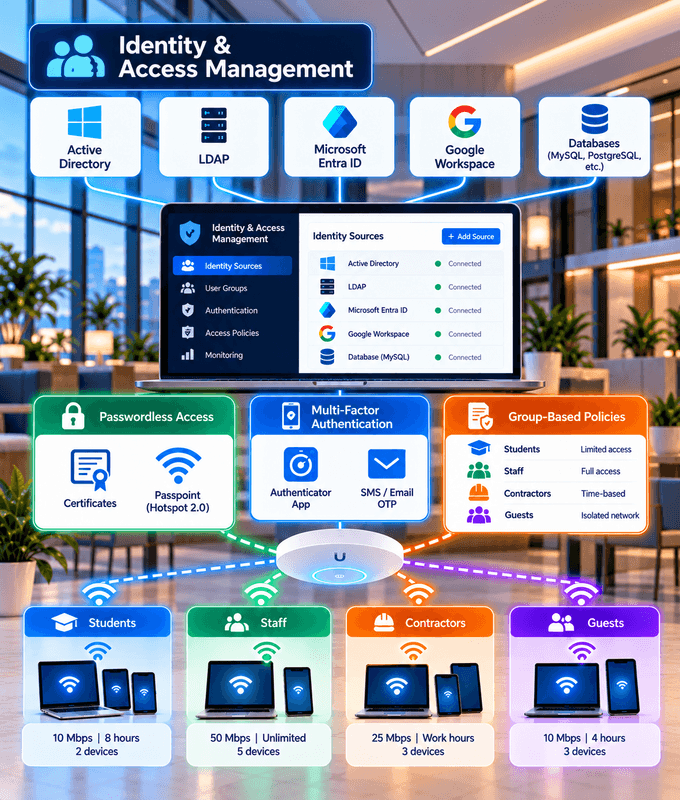
Identity-based access for every user and device
Your Identity Sources
Authenticate users against Active Directory, LDAP, SQL databases and other identity sources you already have.
Cloud Integrations
Connect cloud identity providers such as Microsoft Entra ID and Google Workspace, with RADIUS in the cloud or on-premises.
Automatic Directory Sync
Changes in your directory apply on the network automatically: new users get access, and users disabled in your directory lose it.
Passwordless Access
Users and devices connect with certificates or Passpoint profiles, with no passwords to type, share or steal.
Certificate Issuing for EAP-TLS
We issue and renew the certificates your users and devices need for EAP-TLS, so you don't have to run your own certificate authority.
Multi-Factor Authentication
Require a second verification factor on top of the password for stronger protection of network access.
Access Levels by Group
Apply different policies based on group membership, such as speeds, quotas and the hours users can connect.
Network Segmentation
Place users on different VLANs based on their directory groups, to keep traffic separated.
Account Lifecycle
Set expiry dates on accounts, and revoke one user's access when they leave without affecting anyone else.
Device & MAC Binding
Lock an account to specific devices by MAC address, so credentials can't be used on other devices.
Dynamic Access Changes with CoA
Change a live session's access or disconnect a user instantly with Change of Authorization (CoA).
Logging & Reporting
Keep detailed authentication and session logs, so you always know who connected, when and from where.
Passwordless access
Stronger security and a smoother experience, with no passwords to type, share or steal.
Certificate-Based Authentication
With EAP-TLS, devices authenticate with digital certificates instead of passwords, for the strongest, phishing-resistant security.
Passpoint (Hotspot 2.0)
A profile installed once, through your mobile app or MDM, connects devices automatically and securely from then on.
Zero trust for your network
Never trust, always verify. Every connection is tied to an identity and gets only the access it needs.
Verify Every Connection
Every user and device proves its identity with its own credentials, certificate or profile. Nothing is trusted just for being on the network.
Least-Privilege Access
Users get only the access their role needs, based on their identity and group membership.
Segment the Network
Separate VLANs for different groups and devices keep traffic apart and limit what each one can reach.
Re-Evaluate Continuously
Access changes as soon as an identity does: CoA updates or ends live sessions, and every connection is logged.
Active Directory
Microsoft Entra ID
Google Workspace
LDAP
SQL Databases
And More
Your identity sources, on-premises or in the cloud
On-premises directories such as Active Directory and LDAP, and cloud identity providers such as Microsoft Entra ID and Google Workspace.
Users sign in with the accounts they already have, so there's no separate user database to maintain.
Let users sign in to WPA-Enterprise Wi-Fi with their Google Workspace accounts. See how with FreeRADIUS and Secure LDAP
Assign VLANs and policies based on directory groups. See how with Google Workspace Secure LDAP
Don't see your identity source? We can integrate with others too. Talk to us
Identity and access management in action
From offices to campuses and venues, the right people get the right access.
Enterprises
Staff sign in with their Active Directory or Entra ID accounts, with access based on their role and devices on their own VLAN.
Universities & Campuses
Different access for students, staff and guests, driven by group membership in your directory.
Student Housing & MDUs
Every resident gets their own credentials and service tier, and access ends automatically when they move out.
Hotels
Guests get their own access for their stay, which is decommissioned when they leave.
Retail & Loyalty Programs
Loyalty app members connect automatically and securely with Passpoint every time they visit.
ISPs & WISPs
Subscriber identities tied to their plans, with speeds, quotas, IP assignments and expiry dates.
Companies all over the world are using our products and services




























Frequently Asked Questions
Common questions about identity and access management for your network.
What is identity and access management for a network?
It means every user and device connects with its own identity, checked against your identity source, and gets access based on who they are: the right network, speed, time limits and policies, instead of one shared password for everyone.
Which identity sources do you support?
Active Directory, Microsoft Entra ID, Google Workspace, LDAP and SQL databases, among others. If your identity source isn't listed, get in touch: we can integrate with other identity sources too.
Do you support cloud identity providers?
Yes. We integrate with cloud identity providers such as Microsoft Entra ID and Google Workspace, and our RADIUS servers can run in the cloud or on your premises.
How does passwordless access work?
Devices authenticate with digital certificates (EAP-TLS), which we can issue and renew for you, or with a Passpoint profile installed once through your mobile app or MDM. Either way, there are no passwords to type, share or steal.
Can different users get different access levels?
Yes. Policies can be based on user or group membership, including VLANs, rate limits, time and volume quotas, time-of-day access and simultaneous use limits.
What happens when someone leaves?
You revoke that user's access, or let it end automatically on an expiry date. With CoA, an active session can be disconnected immediately, and nobody else is affected.
Do you support multi-factor authentication?
Yes. You can require a second verification factor on top of the password for stronger protection of network access.
Can we see who connected and when?
Yes. Detailed authentication and session logs, with reporting on users, sessions and usage.
Does network access stay in sync with our directory?
Yes. Changes in your directory apply on the network automatically: new users get access, and users disabled in your directory lose it.
Do you support a zero trust approach?
Yes. Every user and device is verified with its own identity, gets only the access its role needs, and is kept on its own network segment. Access is re-evaluated as identities change, and every connection is logged.