

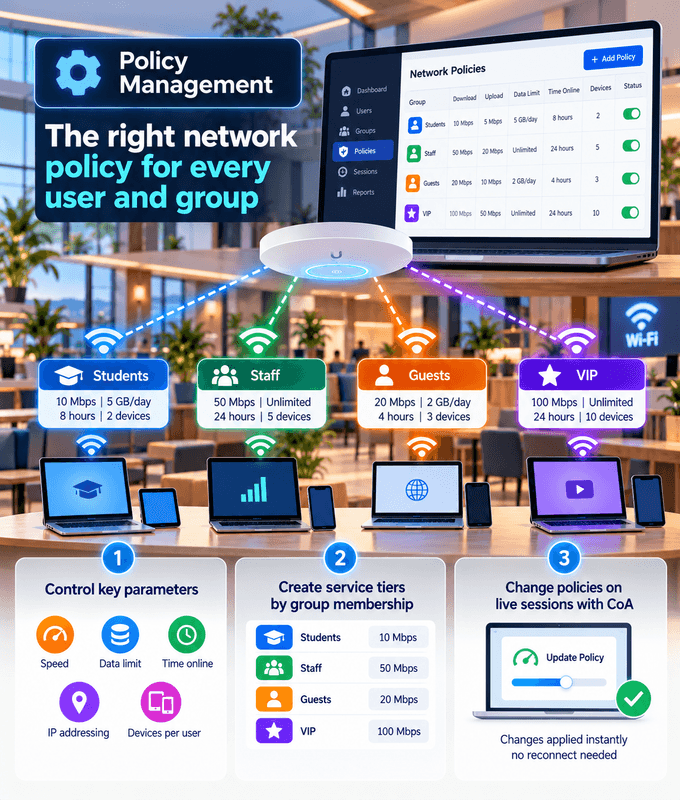
The right network policy for every user and group
Control speed, data, time online, IP addressing and devices per user, plus when and where they can connect.
Create service tiers based on group membership, such as different speeds for students and staff.
Change policies on live sessions with CoA, with no reconnect needed.
Every policy your network needs, in one place
Account Expiration
Set an expiry date on any account, and access ends automatically when it's reached.
Rate Limits
Set upload and download speeds per user, group or service tier.
Time-Based Quotas
Limit how long users can stay online, for example per day or per plan.
Volume-Based Quotas
Limit how much data users can download and upload, for subscriber plans or fair use.
IP Pools
Assign IP addresses from different pools, for example per group, site or service tier.
Static IPs
Give specific users or devices the same IP address every time they connect.
Simultaneous Use Limits
Control how many devices can be connected with the same account at the same time.
Dynamic Updates with CoA
Change a live session's policy or disconnect a user instantly with Change of Authorization (CoA).
Group-Based Service Tiers
Apply different policies based on group membership, such as faster speeds for staff than for students.
VLAN Assignment
Place users on different VLANs based on their directory groups, to keep traffic separated.
Time-of-Day Access
Allow access only at certain times, for example during opening hours or not overnight in student housing.
Device & MAC Binding
Lock an account to specific devices by MAC address, so credentials can't be used on other devices.
Location-Based Policies
Apply different rules per site, building or SSID, so the same user gets the right policy wherever they connect.
Self-Service Upgrades
Let users buy a faster tier or more data themselves, for example through your captive portal's payment flow.
Students
Staff
Guests
Your Own Groups
Service tiers based on group membership
Set policies once for a group, and everyone in it gets the same level of service.
For example, a university can give students one speed and staff a faster one, on the same network.
Group membership can come from the user directories you already use. See supported directories
Assign VLANs and policies based on directory groups. See how with Google Workspace Secure LDAP
Policies for every kind of network
From campuses to service providers, we set up the policies that match how your network is used.
Universities & Campuses
Different speeds and limits for students, staff and guests, based on who they are.
ISPs & WISPs
Turn subscriber plans into speeds, quotas, IP assignments and expiry dates.
Enterprises
Consistent access policies for staff, guests and devices across every site.
Companies all over the world are using our products and services































Frequently Asked Questions
Common questions about network policy management.
What is network policy management?
It's how you control what each user gets once they're connected: their speed, how long and how much they can use the network, which IP address they receive, how many devices they can connect and when their access ends.
Which policies can I apply?
Account expiration, rate limits, time and volume quotas, time-of-day access, IP pools, static IPs, simultaneous use limits, device and MAC binding, VLAN assignment, location-based policies and group-based service tiers, all of which can be updated on live sessions with CoA. Users can also upgrade their own tier, for example through a captive portal.
Can different groups get different speeds?
Yes. Policies can be based on group membership. For example, a university can give students one speed and staff a faster one, on the same network.
What happens when an account expires?
Access ends automatically on the expiry date you set, so temporary accounts don't need to be removed by hand.
Can I limit how many devices a user connects?
Yes. Simultaneous use limits control how many devices can be connected with the same account at the same time.
Can a user always get the same IP address?
Yes. You can assign static IPs to specific users or devices, or assign addresses from different IP pools, for example per group or service tier.
Can I change a policy while a user is connected?
Yes. Change of Authorization (CoA) updates a live session's policy, or disconnects the user, without them having to reconnect.
How is policy management delivered?
Policies are enforced through RADIUS, in the cloud or on-premises, and we set them up to match how your network is used.